How Sliced Inference Works
The Problem: Small Objects in Large Images
Standard object detectors resize input images to a fixed resolution (e.g. 640x640) before running inference. When your source image is much larger, say a 4K drone photo or a satellite tile, small objects get downscaled to just a few pixels and become undetectable.
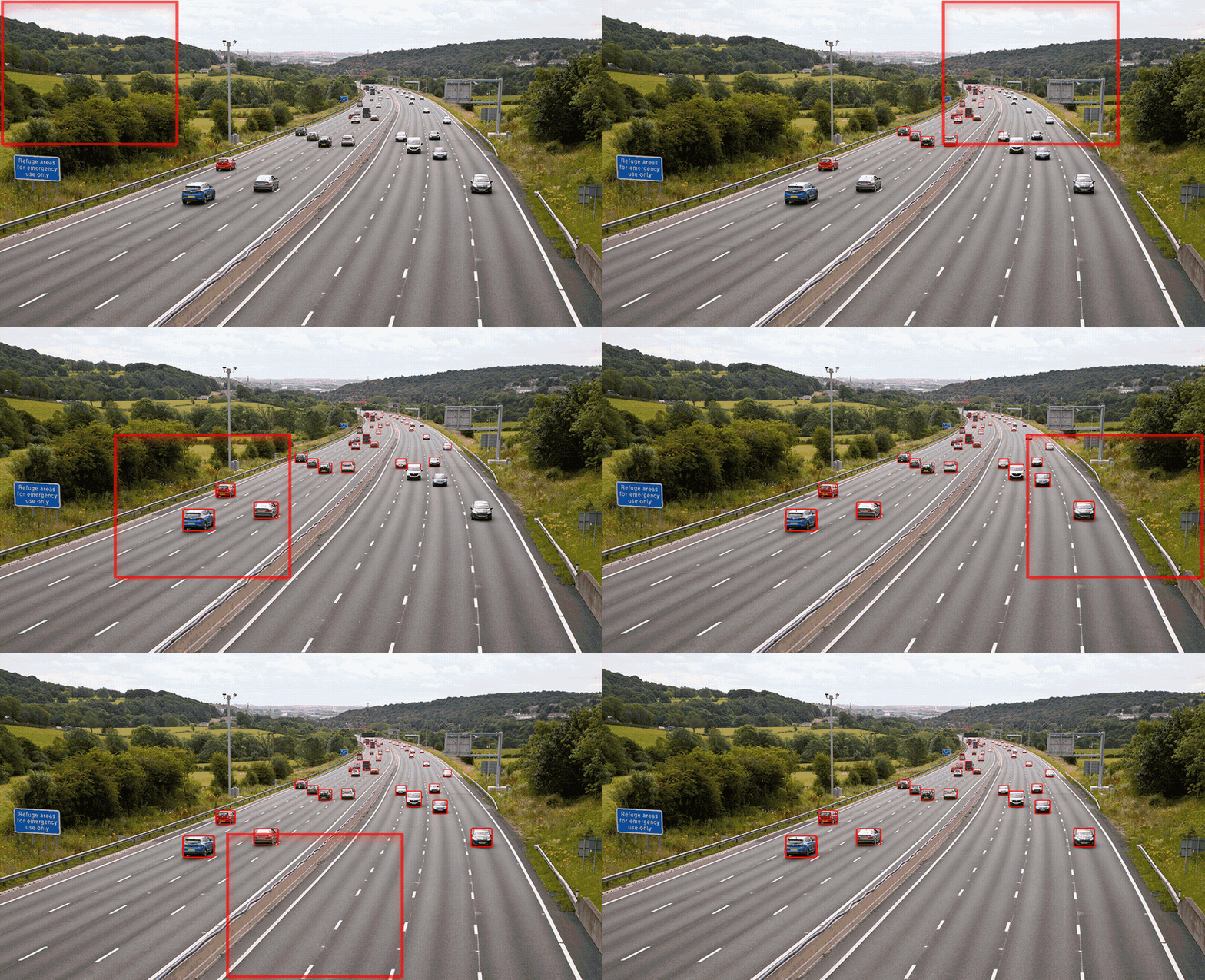
The Solution: Slice, Detect, Merge
SAHI solves this in three steps:
1. Slice the image into overlapping tiles
The input image is divided into a grid of smaller patches. Each patch is sized to match what the detector expects (e.g. 512x512), so objects within each patch retain enough pixel detail for reliable detection.
Overlapping regions between tiles ensure that objects sitting on a tile boundary are fully visible in at least one patch.
+--------+--------+--------+
|        |overlap |        |
|  tile  |<------>|  tile  |
|   1    |        |   2    |
+--------+--------+--------+
|overlap |        |overlap |
|  tile  |  tile  |  tile  |
|   3    |   4    |   5    |
+--------+--------+--------+
Key parameters:
| Parameter | What it controls |
|---|---|
slice_height / slice_width |
Size of each tile in pixels |
overlap_height_ratio / overlap_width_ratio |
Fraction of overlap between adjacent tiles (0.0 to 1.0) |
auto_slice_resolution |
Let SAHI pick tile sizes based on image resolution |
2. Run the detector on every tile
Each tile is passed through the object detection model independently. Because the tiles are small, objects that were tiny in the full image now occupy a meaningful portion of the input and can be detected reliably.
Optionally, SAHI also runs the detector on the full image at its native
resolution (perform_standard_pred=True, the default). This catches large objects
that might get split across multiple tiles.
3. Merge predictions back to the full image
Tile-level predictions are mapped back to full-image coordinates. Because tiles overlap, the same object will often be detected in multiple tiles. SAHI applies a postprocessing step to merge or suppress these duplicates:
- GreedyNMM (default): Greedily merges overlapping boxes by averaging their coordinates and scores. Best for most use cases.
- NMM: Non-Maximum Merging. Similar to GreedyNMM but processes all overlaps simultaneously.
- NMS: Non-Maximum Suppression. Keeps the highest-scoring box and discards overlapping ones. Use when you want strict, non-merged detections.
- LSNMS: Location-Sensitive NMS. A variant that factors in spatial location.
The merge step can use different overlap metrics:
- IOS (Intersection over Smaller): More aggressive merging; good when object sizes vary widely.
- IOU (Intersection over Union): Standard metric; more conservative.
When to Use Sliced Inference
Sliced inference helps most when:
- Your images are significantly larger than the model's input resolution
- You need to detect small objects (vehicles in satellite images, people in wide-angle surveillance, defects in high-res inspection photos)
- Standard detection misses objects or produces low confidence scores
It may not be necessary when:
- Your images are already close to the model's input size
- You only care about large, prominent objects
- Inference speed is more important than recall
Tuning Tips
Tile size: Match the detector's training resolution. For YOLO models trained at 640x640, slices of 512--640 work well.
Overlap ratio: Start with 0.2 (20%). Increase to 0.3--0.4 if you notice missed detections at tile boundaries. Higher overlap means more tiles and slower inference.
Standard prediction: Keep perform_standard_pred=True unless you are certain
all objects of interest are small. The full-image pass catches large objects that
would be split across tiles.
Postprocessing threshold: The postprocess_match_threshold controls how
aggressively duplicates are merged. Lower values merge more; higher values keep
more separate boxes. Default of 0.5 works for most cases.
Next Steps
- Quick Start: Get up and running with SAHI
- Model Integrations: Use SAHI with your detection framework
- Postprocessing Backends: Configure NMS/NMM backend for speed